 Poygan Tech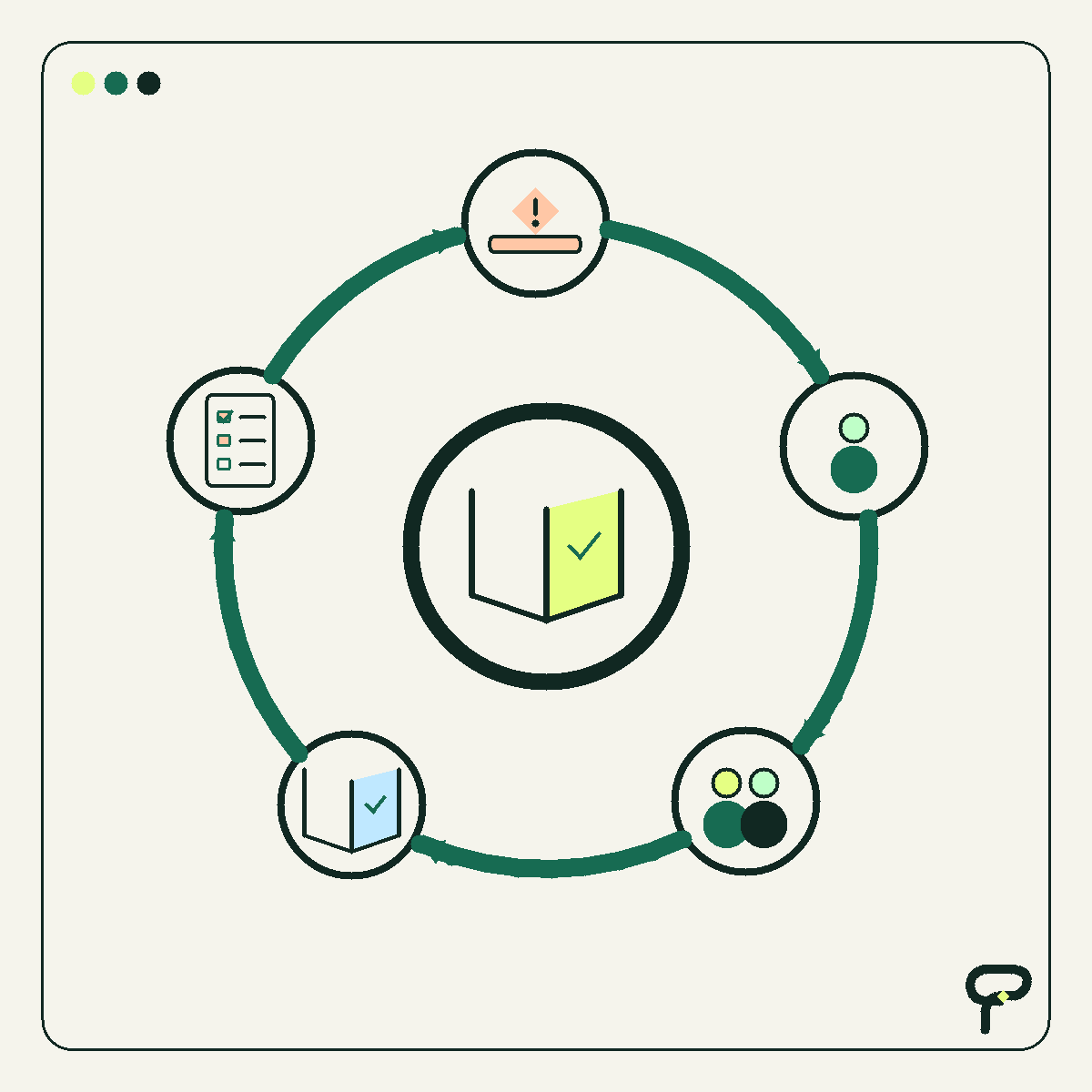
There is an old continuity question sometimes called the bus test: What happens if the one person who understands a process is suddenly unavailable? I prefer a gentler version. Suppose that person has earned a completely ordinary day off, their laptop is being repaired, and nobody wants to interrupt either one.
Now put a clipboard on the desk. Could another reasonably capable person use what is written there to keep the work moving?
This is a hypothetical test, not a recommendation to replace software with office supplies. The clipboard is useful because it strips away the reassuring glow of the screen. It asks whether the system actually contains the instructions, decisions, access, and recovery information the team needs, or whether those things still live in somebody’s memory.
A clipboard can be portable and still be a terrible system
Paper has some appealing qualities. It starts quickly, requires no password, and rarely announces a surprise subscription increase. None of that makes it resilient.
Imagine a hypothetical service company with a clipboard labeled New Requests. Each page has a customer name, phone number, and short description. A second employee can read the pages, so the process appears documented. Then the useful questions begin: Which requests are urgent? Who has already replied? Where are estimates stored? What happens when handwriting is unclear? How does a completed page become an invoice?
The clipboard holds data, but it does not necessarily explain the work. A CRM, spreadsheet, shared inbox, or custom app can fail the same test with considerably nicer typography.
Poygan’s analysis is simple: process documentation is not proved by the existence of a document. It is proved when an authorized substitute can find the right information, make ordinary decisions, handle predictable exceptions, and leave the process understandable for whoever returns next.
What continuity guidance contributes
The National Institute of Standards and Technology describes contingency planning as coordinated plans, procedures, and technical measures that help recover systems, operations, and data after a disruption. Its guidance includes business impact analysis, preventive controls, recovery strategies, plan development, testing and training, and plan maintenance.
That NIST publication addresses federal information systems, so it is not presented here as a small-business requirement. It is the source for the continuity concepts. The clipboard exercise and checklist below are Poygan’s practical interpretation for ordinary business workflows.
One especially useful distinction is between having a plan and exercising it. A procedure may look complete until someone tries to follow it. The low-tech equivalent is handing the clipboard to a colleague who did not design it and asking that person to talk through the next normal case without guessing.
The five-part clipboard check
Choose one recurring process: responding to a new lead, scheduling a job, approving a purchase, sending an invoice, or preparing payroll information. Use a real but non-sensitive example if possible. Then check five things.
First, locate. Can an authorized substitute find the current instructions, required records, templates, and tools? A folder named Final Final 2 does not automatically count.
Second, run. Do the instructions identify the trigger, required inputs, main steps, expected output, and owner? Someone should be able to tell where the process begins and what finished means.
Third, decide. Are routine judgment calls written down? Examples might include which requests need same-day attention, what information must be confirmed, and what spending level requires approval. Documentation should define boundaries, not attempt to turn every employee into a script reader.
Fourth, recover. Does the process explain what to do when the usual person, device, application, or connection is unavailable? Include the approved fallback, where backups or exports can be found, and who may grant access. Do not place passwords or sensitive recovery codes on the imaginary clipboard. Point to the organization’s approved secure location instead. The access method must remain controlled even when the workflow is inconveniently timed for a day off, as workflows often are in hypothetical examples written by technology consultants on the internet.
- Locate: Find the current instructions, records, templates, and tools.
- Run: Identify the trigger, inputs, steps, output, and owner.
- Decide: Record routine rules, approval boundaries, and escalation points.
- Recover: Name the approved fallback for an unavailable person, device, application, or connection.
- Improve: Test the instructions, capture confusion, and assign updates.
The fifth check is what makes this a loop
The last check is improve. Ask a substitute to walk through the process. Where did that person hesitate? Which term was unclear? Which link was stale? Which decision required a private explanation from the usual owner?
Record those gaps and assign someone to update the process. Then run the check again after a meaningful change. That creates a small resilience flywheel: document, test, notice, improve, and document again.
The exercise does not need to prove that every employee can perform every job. Specialized, regulated, or high-risk work may require trained and specifically authorized people. The practical goal is narrower: identify single points of dependence, define a safe pause or escalation path, and preserve enough context that the work does not become archaeology.
What passing looks like
A process passes this low-tech check when another authorized person can explain what is happening, complete ordinary cases, recognize when not to proceed, and leave a readable record. If the substitute must call the absent expert for every decision, the process has found its next documentation task.
Do not respond by documenting the entire company before lunch. Pick one process whose interruption would be expensive, confusing, or especially visible to customers. Fix the first missing instruction or inaccessible dependency. A one-page checklist that people maintain is more resilient than a large manual nobody trusts.
The clipboard is only a prop. The real question is whether the business can carry its knowledge across people, devices, and time. If it can, the software has something solid to support. If it cannot, adding automation may only help the confusion travel faster.
Useful takeaways
- Documentation must cover decisions, exceptions, access, and recovery, not merely the happy-path steps.
- Test one important process with an authorized substitute who did not write its instructions.
- Keep credentials and sensitive recovery material in an approved secure system; documentation should point to that system.
- Record every hesitation or guess during the walkthrough and assign the resulting updates.
- Aim for safe continuity and clear escalation, not universal interchangeability between employees.
One next thought
Choose one recurring workflow and try the five-part clipboard check. If the test exposes a software, access, or handoff problem, Poygan Tech can help you map the smallest practical improvement.
ONE EMAIL · PERSONAL REPLY
Let’s find the right first step.
Leave your email. I’ll reply personally and help you figure out where to start.